Showing posts with label Theme. Show all posts

Wednesday, May 28, 2008

Official Orkut Themes

Are you bored using the same old Orkut theme that whitish one combined with faint touch of blue.Then there is some good news for all Orkut addicts.They just introduced the coolest feature you're gonna see this summer. Orkut has officially launched themes for Orkut addicts. These themes are not yet live on majority of Orkut profiles.So some have to wait for some time to have those themes right on their Orkut Homepage.


If you are interested in changing themes in yours Orkut profiles then Orkut follow the below guidelines !!

  • First of all Login to yours Orkut profiles after that >> Click on Edit Profiles >> Click On Themes Tab as seen in below Image

  • Select Themes of yours choice ,at present only 4 Themes are active . So you can only use 4 Themes in available 12 Themes.


Note:These features is not yet activated in all profiles.Hopefully they will be within a weak or so.

Read the rest...

Digg Technorati del.icio.us Stumbleupon Reddit Blinklist Furl Spurl Yahoo Simpy

Sunday, September 2, 2007

Give Firefox A Aero Look.

Give Mozilla Firefox a fresh look with Windows Vista Aero interface.


Its really looks amazing and cool.So I would say just try out this.
Just go to the Mozilla Firefox official Website and click on the Add Ons and then on themes.

There you will find many wonderful themes which will change the look and feel of the firefox.For this part only download the Vista Aero theme.

Note:People using other than Firefox i.e Opera or IE, just download and save it anywhere you like.It will be saved as .JAR file.To install the theme follow this process:

STEP#1:Open Firefox--->Tools--->Add-ons---->Themes

STEP#2:Open the folder where you have downloaded the Theme(.jar file).Now just drag and drop it in the Theme pane of the firefox above.

STEP#3:It will ask you to install and then restart the Firefox to get a fresh look.

It is applicable to other themes also.So just experiment with the freshness.

Direct Download link of the Vista Aero Theme

Read the rest...

Digg Technorati del.icio.us Stumbleupon Reddit Blinklist Furl Spurl Yahoo Simpy

Tuesday, June 19, 2007

Make Your Windows XP look like Windows Vista

================================

VistaVG Ultimate by Mr. Vishal Gupta

================================

Hi guys

This is a tutorial which will give your Windows XP a touch and feeling of Windows Vista.
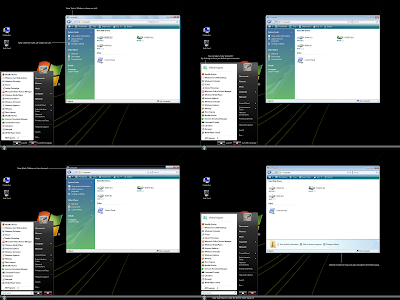


Download VistaVG Ultimate by Vishal Gupta

Download VistaVG Ultimate with Searchbar by Vishal Gupta


It has many new features and new styles which will give you the essence of Windows Vista.

NEW:

1. A new style "Black" has been added to the theme after a lot of demand for black titlebar.
2. A separate theme for Startmenu Searchbar lovers. It shows the Vista searchbar in Start menu but its fake. You need "LSPatch" to use it. I have included it in the pack.

And more...

UPDATE:

1. Titlebar Text is shown in Left now.
2. Common Tasks are also shown in Left but I have included a "shellstyle.dll" file for bottom common tasks.
3. Aero style for 32x icon size is default now.
4. Lots of new Vista images, like "All Programs" arrow, Explorer arrows, Startmenu images, Logoff/Shutdown images, etc.
5. A few colors changed.

And lots of other small updates...

HOW TO USE:

1. Extract the contents and u'll get a folder.
2. In this folder, you'll get 4 more folders:

=> Bottom Common Tasks (This folder contains "shellstyle.dll" file for showing common tasks in explorer at bottom.)
=> Fonts (This folder contains Segoe UI fonts required for the theme. Copy them to "%windir%\Fonts" folder.)
=> Styler Toolbar (This folder contains Style toolbar for explorer. You need "Styler" installed on your system.) You can download Styler from here:

http://www.crystalxp.net/galerie/en.id.551.htm

=> Theme (This folder contains the main theme.)

3. Copy all contents in "Theme" folder to "%windir%\Resources\Themes\" folder.
4. Now you can set the theme using Desktop Properties.

Before applying the theme make sure you have patched the "uxtheme.dll" file to allow 3rd party visual styles, if its not patched, then download and run the UXtheme Patcher from here:

http://www.softpedia.com/progDownload/Uxtheme-Multipatcher-Download-2369.html

Read the rest...

Digg Technorati del.icio.us Stumbleupon Reddit Blinklist Furl Spurl Yahoo Simpy